
BlogPosting Schema: Complete Implementation Guide for Blog and News Articles


Table of Contents +
- What Is BlogPosting Schema, and Why Does It Matter?
- BlogPosting vs Article vs NewsArticle: Which Type Should You Use?
- Which Fields Does BlogPosting Schema Require?
- How Do You Build a BlogPosting Schema JSON-LD Block?
- Common BlogPosting Schema Mistakes to Avoid
- How Do You Test and Validate BlogPosting Schema?
- How Does BlogPosting Schema Affect AI Answer Engine Visibility?
- FAQ
- References
Build BlogPosting schema in JSON-LD: the exact fields, a copy-ready example, validation steps, and how the markup earns AI answer engine citations.
When Google or an AI answer engine encounters your blog post, it doesn't read the page the way a person does. It runs a parser that hunts for a machine-readable layer buried in the HTML - a block of JSON-LD that names the entities on the page: this is an article, here is its author, this is when it was published. BlogPosting schema is that layer for blog content, and it's the thing standing between your post and the enhanced treatment you want it to get.
When the layer is missing or malformed, the parser falls back to guessing from raw text - and guessing produces plain blue links instead of enhanced result cards, and low-confidence attribution instead of a citation in an AI-generated answer. That gap isn't cosmetic. It decides whether the page is even eligible for the richer treatment competitors with correct markup are already getting. This guide traces the layer from field to result and walks you through building it, validating it, and making it work for both search and AI visibility.
What Is BlogPosting Schema, and Why Does It Matter?
BlogPosting schema is a Schema.org type that labels a page as a blog article and hands its core metadata - headline, author, publication date, and images - to search engines and AI systems. It's a subtype of Article, so it inherits every Article field while signaling specifically that the content is a blog post rather than raw text a crawler has to interpret.
That distinction matters because structured data is what makes a page eligible for enhanced treatment. When your markup is valid and matches the content, Google can render a richer result card, and the publication date, author, and headline it pulls from the markup are exactly the signals that lift click-through. BlogPosting sits alongside the other article schema core fields - headline, author, publication date, and image - that communicate blog metadata for rich results eligibility. Getting this layer right is the difference between article schema rich results and a plain blue link.
If structured data is new to you, start with the fundamentals in our complete guide to structured data for SEO, then come back here for the blog-specific implementation. The visibility gains from correct schema markup come from search engines identifying page information more accurately and surfacing it in richer result formats. AI answer engines lean on the same layer for a related job: they extract the author and date to decide how confidently they can attribute a passage before citing it.
GetTraffic writes and publishes SEO content automatically - articles that build authority and drive organic traffic - start your free trial.
BlogPosting vs Article vs NewsArticle: Which Type Should You Use?
Use BlogPosting for ongoing blog and editorial content, NewsArticle for time-sensitive journalism, and generic Article when the content fits neither cleanly. All three are Article subtypes that share the same core fields, so the choice is about matching the label to your content's purpose - a signal search engines and AI systems use to categorize the page correctly.
The confusion usually comes from the fact that the fields overlap almost entirely. Article is the parent type; BlogPosting and NewsArticle inherit from it and add semantic precision. Picking news article schema for a standard evergreen guide, or BlogPosting for a breaking-news wire story, sends a mismatched signal - the markup is still valid, but it describes the wrong kind of content, and that undercuts the accuracy the whole layer exists to provide.
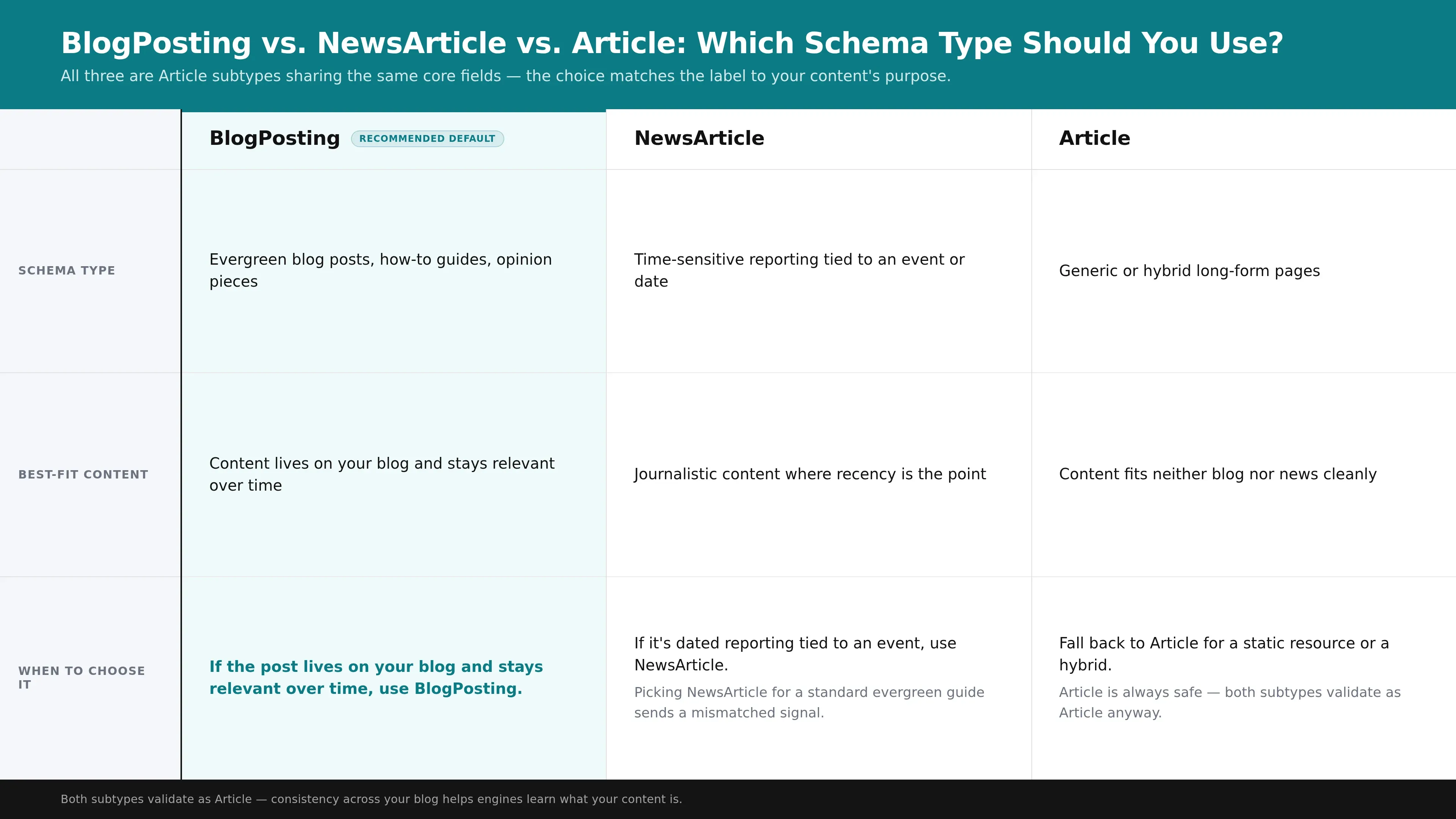
| Schema type | Best-fit content | When to choose it |
|---|---|---|
| BlogPosting | Evergreen blog posts, how-to guides, opinion pieces | Content lives on your blog and stays relevant over time |
| NewsArticle | Time-sensitive reporting tied to an event or date | Journalistic content where recency is the point |
| Article | Generic or hybrid long-form pages | Content fits neither blog nor news cleanly |
The practical rule: if the post lives on your blog and stays relevant over time, use BlogPosting. If it's dated reporting tied to an event, use NewsArticle. If you're marking up a page that's neither - a static resource or a hybrid - fall back to Article. When you genuinely can't decide, Article is always safe, because both subtypes validate as Article anyway. What you should avoid is switching types arbitrarily across your blog; consistency helps engines learn what your content is.
Which Fields Does BlogPosting Schema Require?
BlogPosting's essential fields are headline, description, image, datePublished, dateModified, author, and articleBody, with keywords and a publisher Organization recommended. Each field answers a specific question a parser asks about the page - who wrote it, when, what it's about - and together they form the metadata search engines and AI systems extract to represent your post.
Here is what each field communicates:
- headline - the post title, and the primary label a parser attaches to the article. Keep it close to your visible H1.
- description - a short summary of the post, used as a fallback snippet.
- image - one or more URLs to the featured image; supplying multiple aspect ratios gives search engines flexibility in how they render the card.
- datePublished - when the post first went live, in a machine-readable date format.
- dateModified - when it was last meaningfully updated, which signals freshness.
- author - a nested Person object carrying at least a name, and ideally an affiliation and a link to a profile.
- articleBody - the full text of the post, which lets machines confirm the content matches the metadata.
- keywords - the topics the post covers, reinforcing subject relevance.
Two companion types belong on almost every article page. An Organization object in the publisher field establishes who published the post, and a BreadcrumbList communicates where the page sits in your site hierarchy - see our step-by-step BreadcrumbList JSON-LD guide for that implementation. Where BlogPosting differs from generic Article is in intent, not in required fields: the field set is inherited wholesale, but the type name tells engines to treat the page as blog content rather than a generic document.
How Do You Build a BlogPosting Schema JSON-LD Block?
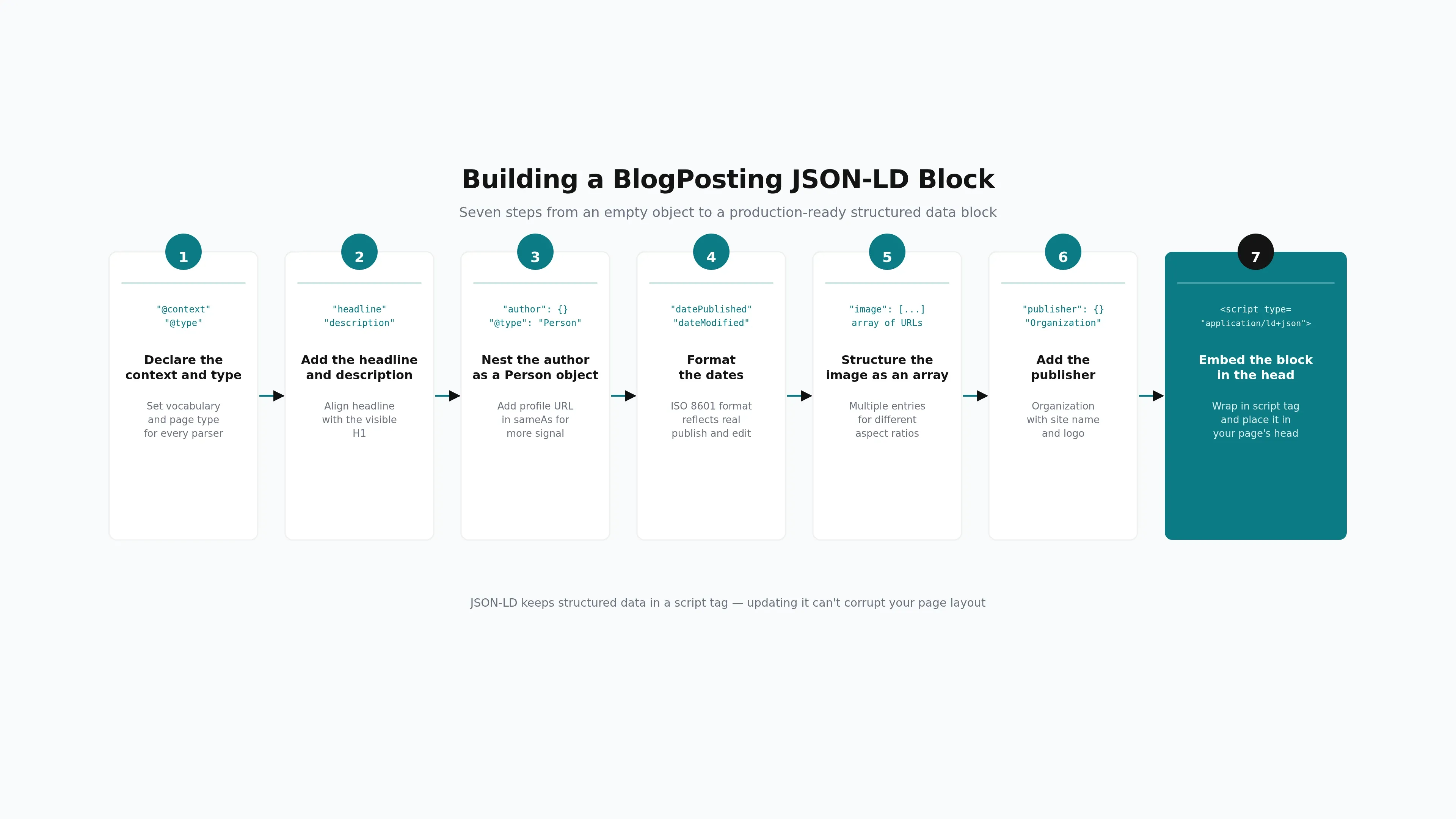
To build a BlogPosting JSON-LD block, declare the type, fill the core fields, nest the author and publisher as objects, format the dates correctly, structure the image as an array, and embed the finished block in a script tag in your page's head. JSON-LD is the format to use because it keeps the markup separate from your visible content.
JSON-LD is the preferred format for structured data precisely because it lives in a script tag rather than being woven through your HTML attributes - updating it can't corrupt your page layout. Here is a minimal valid blogposting schema example with just the fields a parser needs to recognize the page:
- "@context": "https://schema.org"
- "@type": "BlogPosting"
- "headline": "How to Implement BlogPosting Schema"
- "author": { "@type": "Person", "name": "Jane Doe" }
- "datePublished": "2026-07-30"
- "image": "https://example.com/cover.jpg"
That validates, but a fully-featured block earns more. The steps below build one out from scratch - the same article schema example you'd ship on a production blog.
What you'll need
- Your post's metadata: title, summary, author name, publish and update dates, and featured image URL
- Access to your CMS template head or a custom HTML field
- Google's Rich Results Test for a validation pass
Declare the context and type.
Open the object by setting "@context" to "https://schema.org" and "@type" to "BlogPosting". These two lines tell every parser which vocabulary you're using and that the page is a blog post.
Add the headline and description.
Set "headline" to your post title and "description" to a concise summary. Keep the headline aligned with the visible H1 so the markup and the rendered page agree.
Nest the author as a Person object.
Instead of a plain string, use "author": { "@type": "Person", "name": "..." }. Add the author's profile URL in a "url" or "sameAs" field when you have one - a nested object carries far more signal than a bare name.
Format the dates.
Set "datePublished" and "dateModified" using an ISO 8601 date such as "2026-07-30". Both fields should reflect real events - the first publish and the last meaningful edit.
Structure the image as an array.
Provide "image" as an array of URLs pointing to high-resolution files. Multiple entries let search engines pick the aspect ratio that fits the result format.
Add the publisher.
Nest a "publisher" Organization object with the site name and logo. This ties the post to the entity that stands behind it.
Embed the block in the head.
Wrap the finished JSON in a script tag with the type application/ld+json and place it in your page's head. That's the container search engines read.
Authoring this block by hand for every post is where blog teams lose time. Platforms that generate schema during drafting remove that step entirely - GetTraffic embeds validated BlogPosting and Article markup into each article before it publishes, so there's no field-by-field JSON authoring per post.
Common BlogPosting Schema Mistakes to Avoid
The most common BlogPosting schema mistakes are a missing datePublished, a malformed author object, incorrectly formatted dates, missing or undersized images, and a type that doesn't match the content. Each one either disqualifies the page from rich result eligibility or weakens the signal, because the parser drops fields it can't read cleanly.
Here are the errors worth checking for before every publish:
- Missing datePublished. Without a publication date, the post loses the freshness signal and the date that would otherwise appear on the result card.
- Author as a plain string. Writing "author": "Jane Doe" instead of a nested Person object strips out the structure engines use to connect the byline to a real entity.
- Wrong date format. A human-friendly "July 30, 2026" instead of a machine-readable ISO 8601 date fails to parse.
- Missing or undersized images. No image URL, or an image below the resolution search engines expect, removes the visual element from the card.
- Type mismatch. Marking a blog post as NewsArticle, or vice versa, describes the wrong content category even when the JSON is otherwise valid.
SEO content that ranks, written and published for you
GetTraffic creates authority-building content clusters for your business. No writing, no freelancers, no content calendar. Agency-quality results at 91% less cost.
Start My Free TrialHow Do You Test and Validate BlogPosting Schema?
Validate BlogPosting schema before publishing by running the page or code through Google's Rich Results Test and the Schema.org validator. The Rich Results Test confirms whether the markup qualifies for a rich result and flags errors; the Schema.org validator checks that your syntax and field usage are correct. Fix every error before the post goes live.
Read the results in two passes. First, resolve errors - these are the problems that block rich result eligibility, like a missing required field or a malformed object. Then review warnings, which flag recommended fields you've omitted; they don't disqualify the page, but they leave signal on the table. A clean pass on both tools means the markup is structurally sound and ready to ship.
Validation matters for more than rich results. A parse error that stops Google from reading your BlogPosting block also stops AI answer engines from extracting the author and publication metadata they use to attribute content - so validation protects both traditional and AI visibility at once. For a deeper walkthrough of the validation step, see our guide on how to validate schema markup before publishing.
Running this check by hand on every post is the friction point most teams hit. Building validation into the publishing workflow - so markup is verified before it reaches the CMS rather than caught after the fact - keeps content velocity up without trading away correctness.
How Does BlogPosting Schema Affect AI Answer Engine Visibility?
BlogPosting and Article schema with author information correlates with higher citation rates in AI answer engines like ChatGPT, Perplexity, and Google AI Overviews. The structured author, date, and headline signals give these systems machine-readable confirmation of who is behind the content and when it was published - inputs they weigh when deciding which pages to cite.
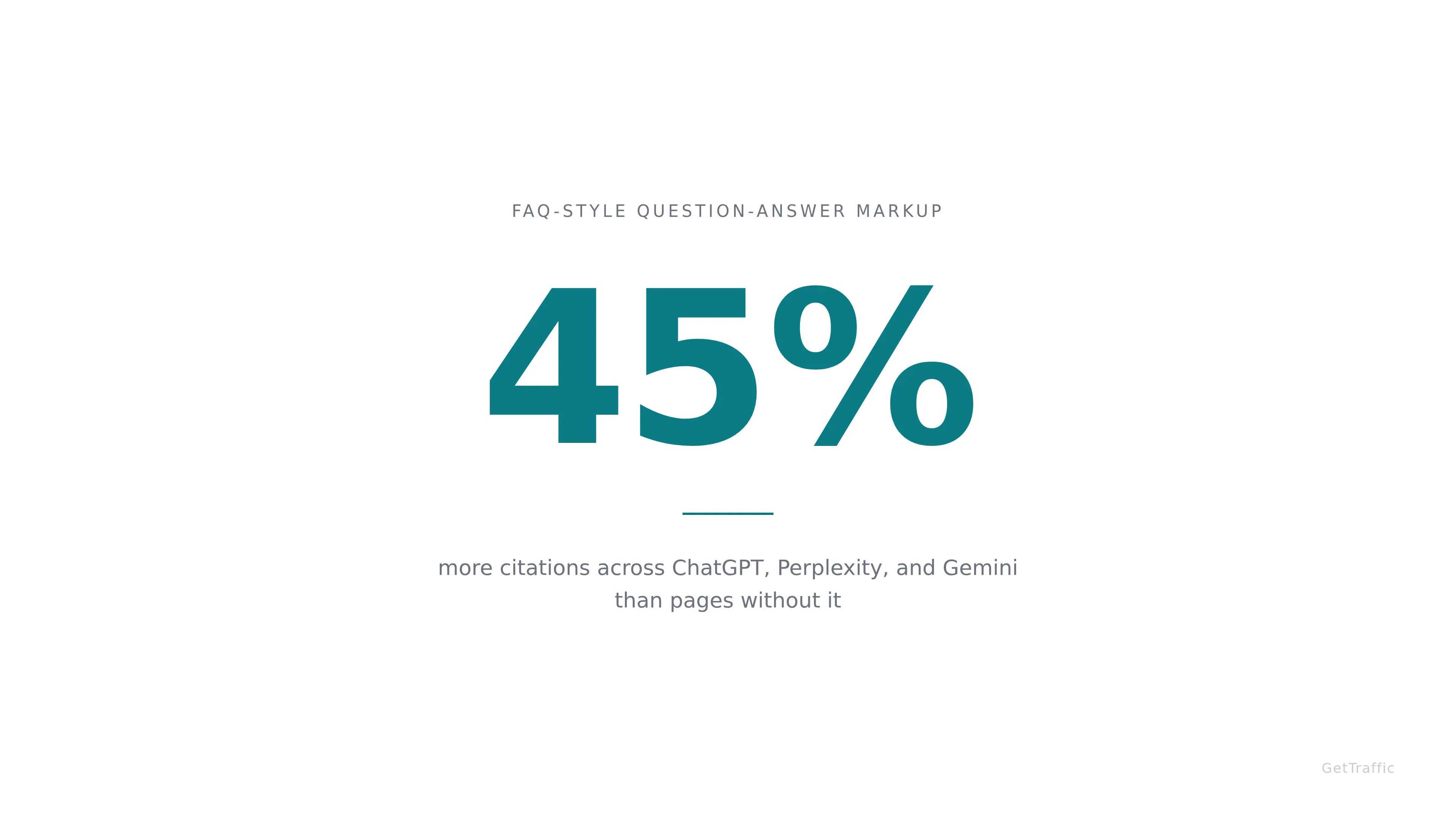
The clearest quantified evidence points to FAQPage schema specifically: one analysis found that pages carrying FAQ-style question-answer markup earn roughly 45% more citations across ChatGPT, Perplexity, and Gemini than pages without it. For BlogPosting, the working mechanism is the author and publication signals - structured author markup helps these engines attribute expertise to a named person rather than an anonymous page.
The important nuance: schema works as a verification layer, not a stand-in. The strongest citation results come when your structured author data confirms signals that are already visible on the rendered page - a real byline, an author bio, a publication date shown to readers. Add the markup on top of those visible authority signals, not in place of them, and the two reinforce each other.
Because Article and FAQPage schema so often share a page, it's worth pairing this implementation with question-answer markup where your content supports it - our guide on how FAQPage schema influences AI answer engine citations covers that side. Together they give AI systems more structured surfaces to extract and cite from a single post.
BlogPosting schema is the machine-readable layer that lets search engines and AI systems recognize your blog content for what it is - a byline, a date, a headline, and an image, tied to a real author and publisher. Build it in JSON-LD, fill the recommended fields, match the type to your content, validate before you publish, and pair the markup with visible authority signals on the page. Each step is small; skipping any one of them quietly costs you eligibility.
Done per post by hand, that's a recurring tax on every article you ship. Done inside the publishing workflow, it's invisible - the markup is just there, validated, on every post.
FAQ
Is BlogPosting schema better than generic Article schema for blog posts?
For content that lives on your blog, yes - BlogPosting is the more precise label. It's a subtype of Article and inherits the same fields, so you lose nothing by choosing it, and you gain a clearer signal that the page is a blog post. Use generic Article only when the content doesn't fit the blog or news category cleanly.
What's the difference between datePublished and dateModified?
datePublished records when your post first went live; dateModified records the last time you meaningfully updated it. Both belong in your BlogPosting markup, and both should use a machine-readable ISO 8601 date. Keeping dateModified current when you revise a post signals freshness, while an accurate datePublished gives search engines the original date to display on the result card.
Do I need to validate schema markup for AI answer engines too?
Yes. A parse error that stops Google from reading your BlogPosting block also stops AI answer engines like ChatGPT and Perplexity from extracting the author and publication metadata they use to attribute and cite content. Running the Rich Results Test and the Schema.org validator before publishing protects both traditional rich result eligibility and your AI citation probability in a single pass.
Can CMS plugins generate BlogPosting schema automatically?
Yes. Plugins such as Yoast SEO and Rank Math generate baseline Article and Organization markup automatically from your post's title, author, date, and featured image. They cover standard cases well but limit advanced fields, so complex setups may need custom template work or a platform that builds and validates the markup during drafting before publishing.
References
Get your business on page 1 of Google
Get your business found on Google - SEO content written and published automatically.
Start My Free Trial7-day free trial